
Condition reports,
screened your way.
Nuclearn CAP AI helps anyone at the plant write a complete condition report in plain words, screens it against your own codes and procedures with the reasons shown, and keeps the actions, history and trends together. Your screeners keep the decision.
- Uses your plant's form, codes and procedures
- At your site or hosted by Nuclearn
- Signs in through Nuclearn
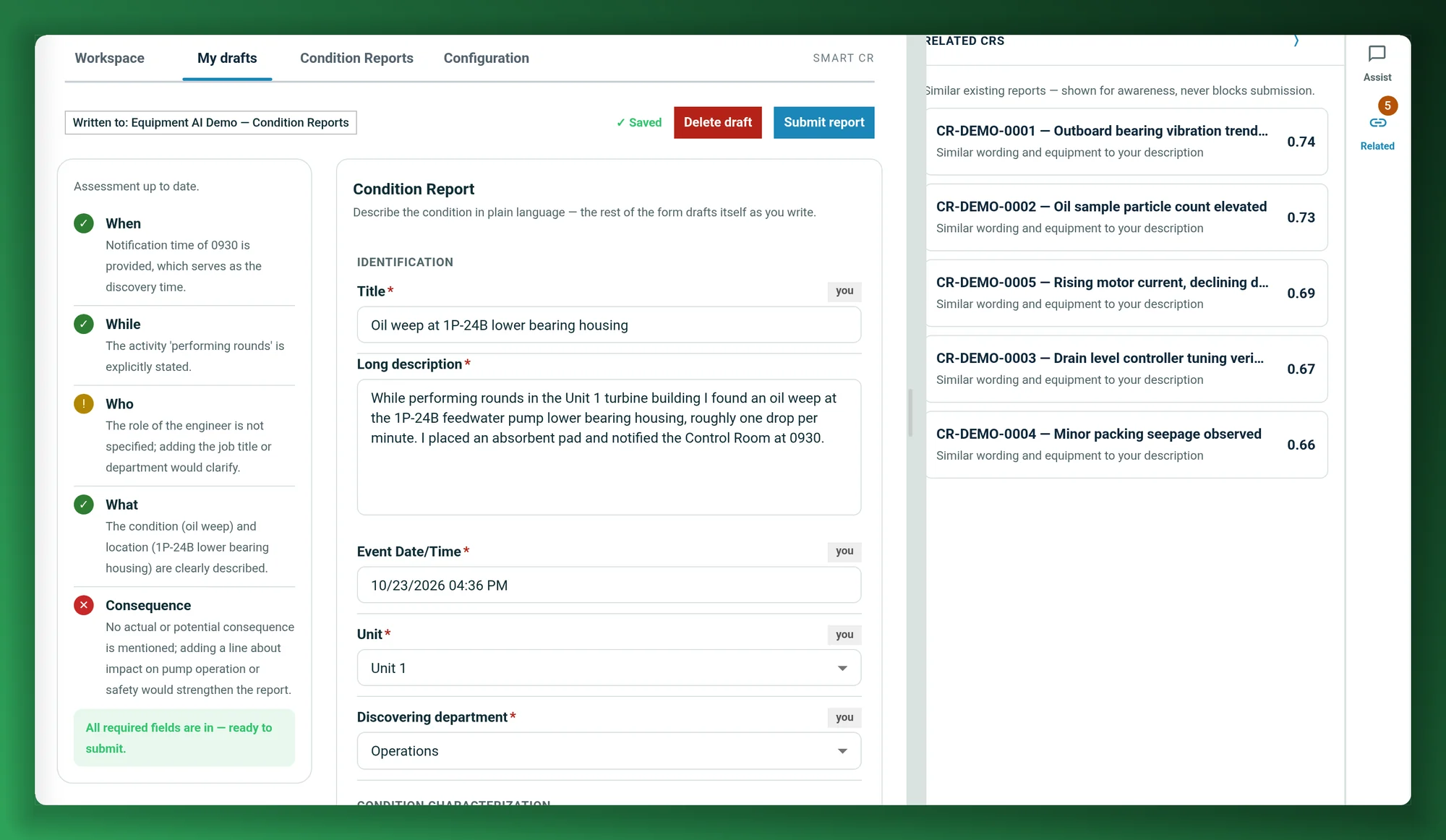
Screenshots on this page show synthetic demo condition reports, as they appear in Nuclearn CAP AI today.
- Backed by NuclearnAI software built for nuclear plants since 2021
- Over 70 facilitiesNuclearn products serve sites in North America and the U.K.
- ISO/IEC 27001:2022Certified information security management
From the first report to the trend it belongs to.
A condition report starts with someone writing it down and ends with a screener deciding what it means. CAP AI helps with the work in between, using your plant's own form, codes and history.
Screen new condition reports
Significance, priority, operability and reportability, owner and trend codes, suggested for each new report with the reasons and sources behind them. Routine reports move on; the rest wait for a screener.
See screening → Anyone at the plantWrite a complete report the first time
Describe the condition in plain words and the form fills itself in, checked as you write against what your plant expects a good report to say.
See Smart CR → Initiators and screenersCatch duplicates before they're filed
Similar past reports appear while you write and on the record, so a repeat condition gets linked to what's already known instead of being logged twice.
See similar reports → CAP and performance improvementSee trends while they form
Trend codes on each report feed a live dashboard of performance objectives and criteria, year over year, sliced by any field you need.
See trending → Owners and action holdersKeep the record moving
Actions, assignments, comments with @mentions, attachments and a revision history on one record, plus a feed of what moved on the equipment and units you follow.
See the record → EveryoneRaise a report from AtomAssist
Ask AtomAssist to write it up. It drafts the report into your Draft Box with the same checks as the form, and you review it and submit.
See AtomAssist →Thousands of reports a year, each one read by hand.
A healthy corrective action program depends on a low threshold for reporting, so the reports keep coming: equipment, procedures, people, paperwork. Each one has to be read, classified, coded and assigned, and a screening meeting settles the hard ones.
When a report leaves out what was going on, who found it or what it affects, the screener goes back to the person who wrote it. When nobody spots that it was reported last month, it's logged twice.
CAP AI takes the routine reading off your screeners' desks and helps the person reporting get it right the first time.
INL's conservative estimate, from a survey of condition report datasets from multiple utilities.
INL's estimate of what screening costs today: checking whether a condition is already reported; judging criticality, operability, significance and severity; each department's validation; and the screening meetings. Online work only, at $200/hr.
INL's figures are its estimates of what these steps cost now, not savings from Nuclearn CAP AI; its step times are expert estimates and vary by plant. Outage work is not included. Sources at the foot of the page.
Fits the way your CAP already works
Start with screening on the system you have, or bring intake and the record into Nuclearn with Smart CR.
Report the condition
Write it in Smart CR, raise it from AtomAssist, or keep using your current CAP system. CAP AI picks up new reports as they arrive.
CAP AI screens it
Your plant's screening template suggests each field from the narrative, your procedures and similar past reports, and shows why.
Your screeners decide
Reports inside your thresholds move on. The rest land in a screener's queue, and a sample you set goes to a person regardless.
Screening you can check, report by report.
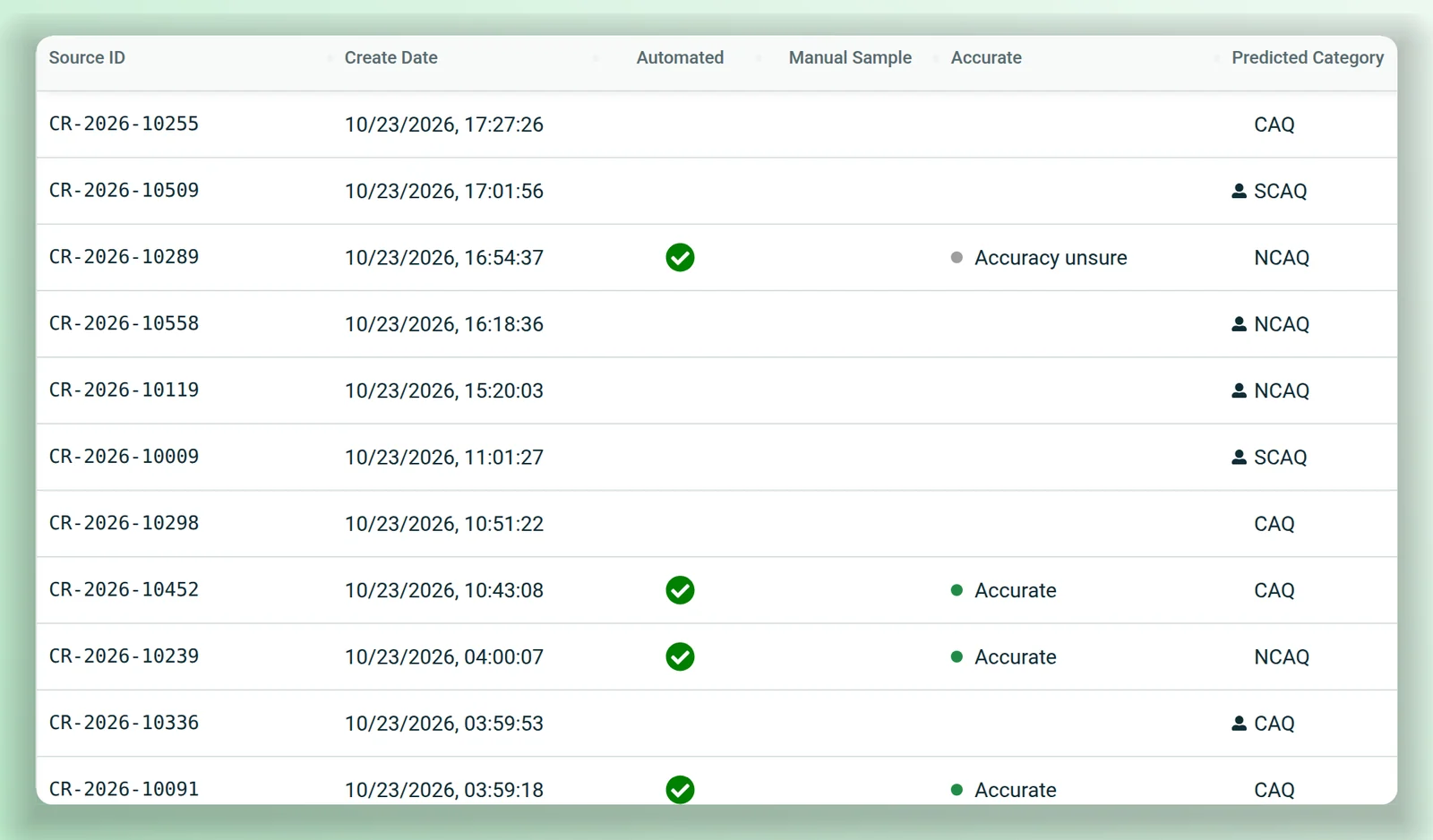
For each new report, CAP AI suggests the screening fields your plant uses: significance, priority, operability, reportability, owner, trend codes and more. Fields inside your thresholds move on; the rest go to a screener. The audit history shows which reports were screened automatically and which fields went to a person, with what the model was given and how confident it was.
Screening decisions stay with your plant: you set the thresholds and the sample, and only people with screening authority can record or change a decision.
A complete report on the first try.
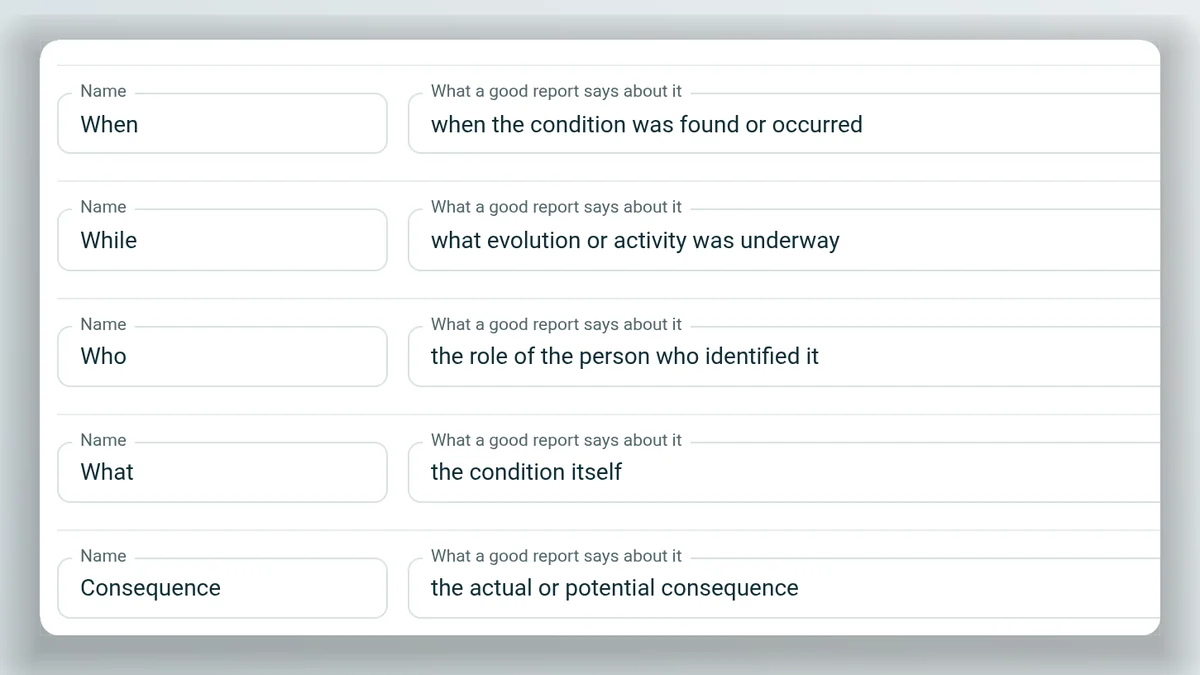
Describe what you found in your own words. Smart CR drafts the rest of your plant's form as you type and grades the description live against what your plant says a good report contains: by default, when, while, who, what and the consequence. Before you submit, it lists what's still to confirm.
- Similar past reports appear as you write, before anything is filed.
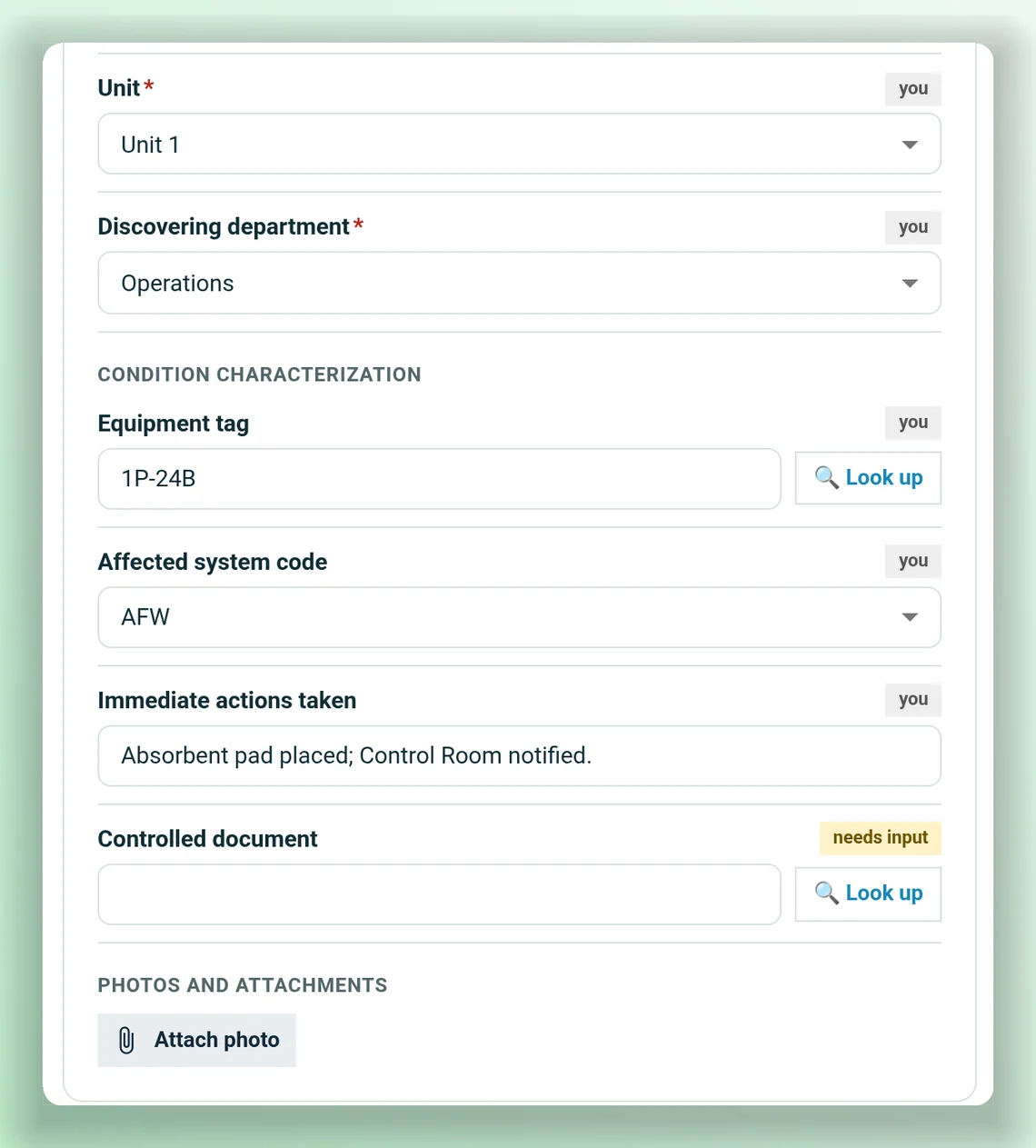
- Find the equipment in your plant's equipment list, and tie the report to a controlled document.
- Attach a photo, and Smart CR can draft the report from what it shows.
- Ask the assistant beside the form what a screener will look for.
Suggested classifications are marked as suggestions: you decide, and the screening committee finalizes. On submit, the report goes to your plant's dataset and is screened by the template your administrator chose.
One record, from the report to its actions.
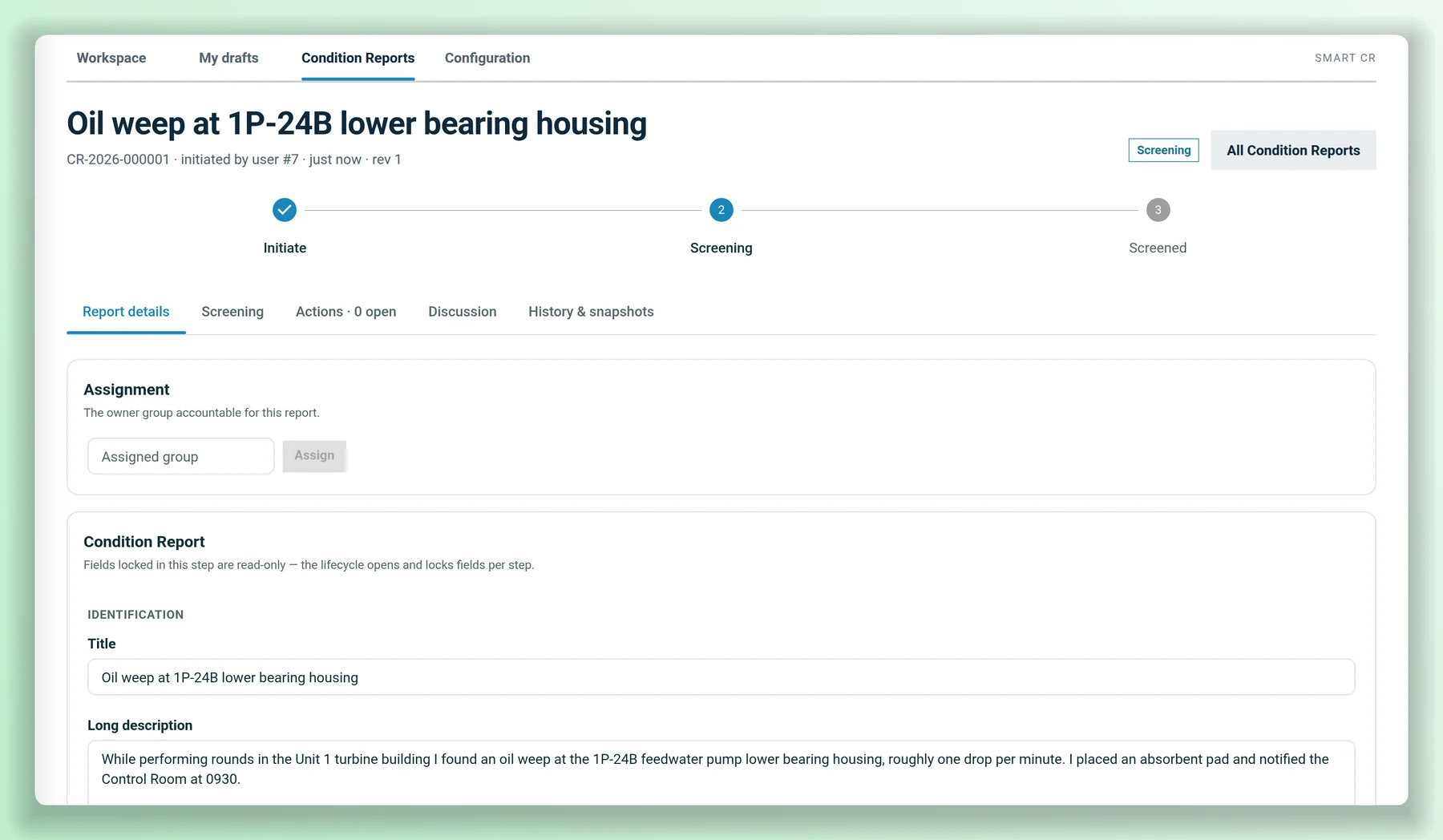
Each condition report has one record in the Smart CR workspace: the report, its screening decisions and evidence, the actions it owes, the discussion and the files. Assign it to an owner group and pull a colleague in with an @mention.
- Actions for evaluations, action items, work orders and commitments, with due dates, work-order references, apparent cause, extent of condition and cause codes.
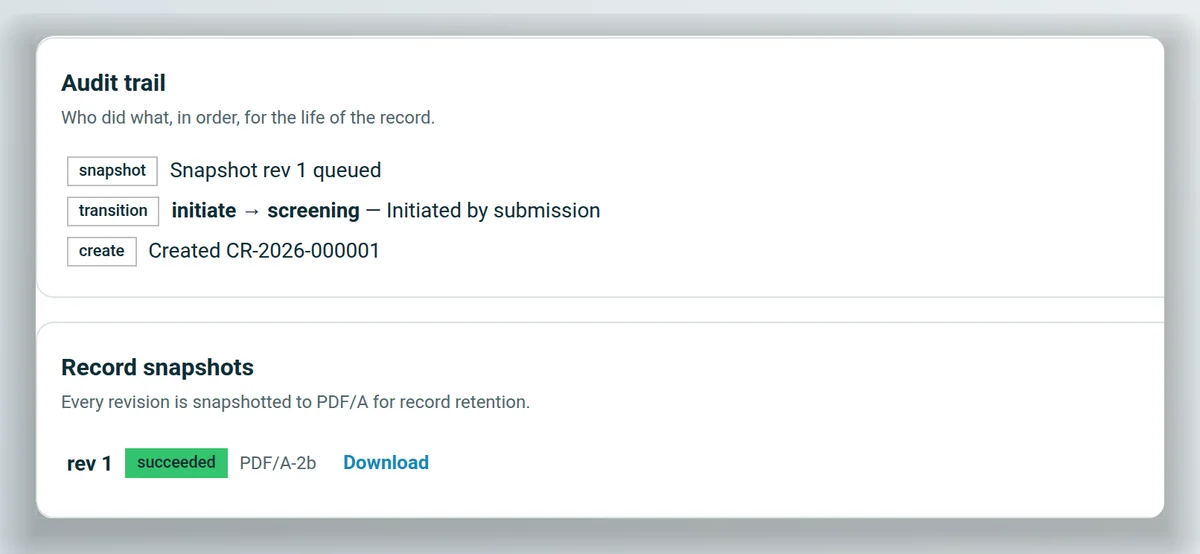
- A history of who did what, in order, and a PDF/A snapshot of each revision.
- Fields open and lock by step, so what was reported stays as reported.
Coming next: the review, closure and effectiveness-review steps of the record's lifecycle, set up for your plant the same way.
Follow what matters to you.
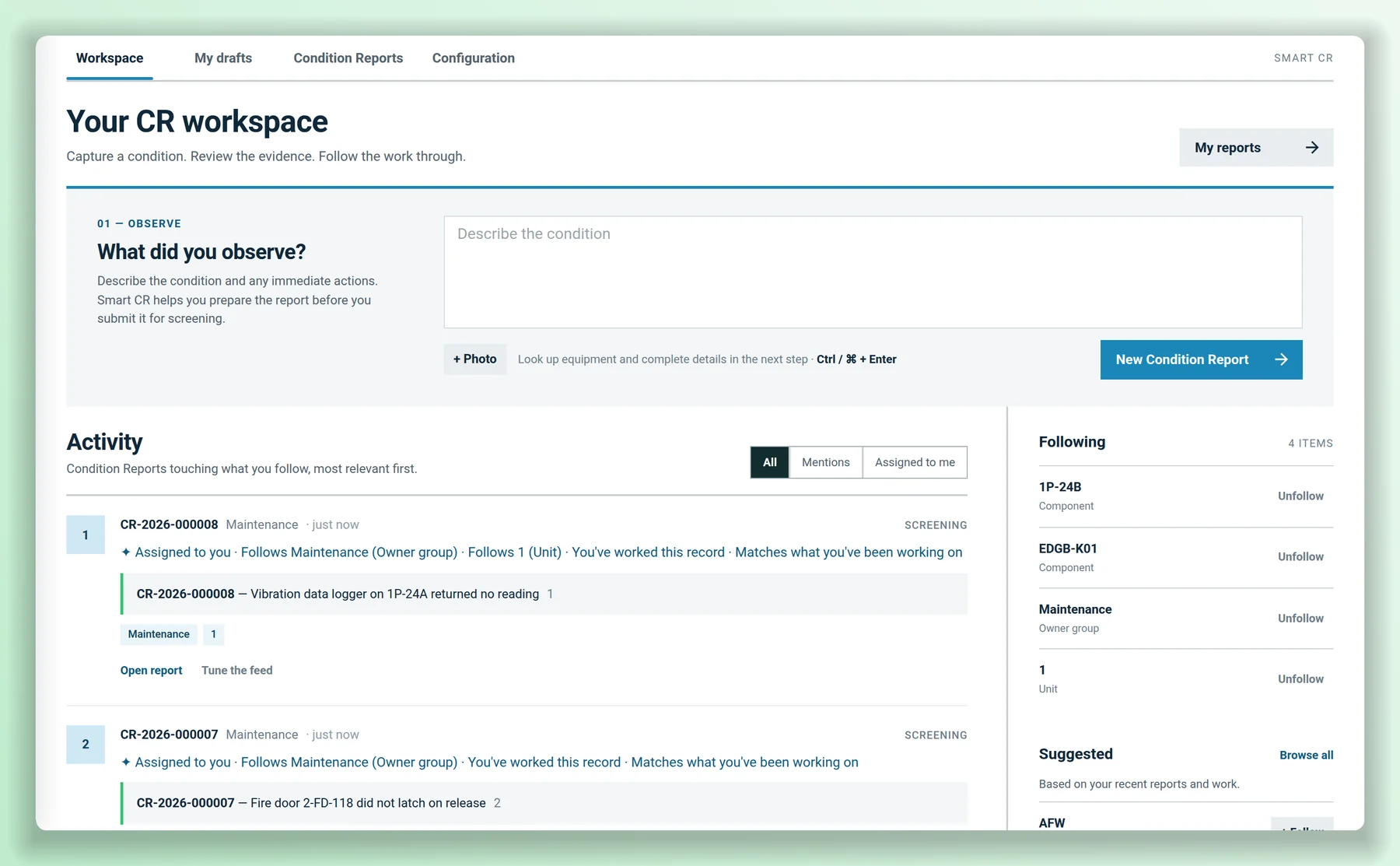
The Smart CR workspace opens on a feed of condition reports touching what you follow: a component, an owner group, a unit or a trend code. Reports assigned to you and ones where a colleague @mentioned you show up too, each with the reason it's there. Raise a new report from the same page.
- Follow or mute anything, with suggestions from your plant's recent reports.
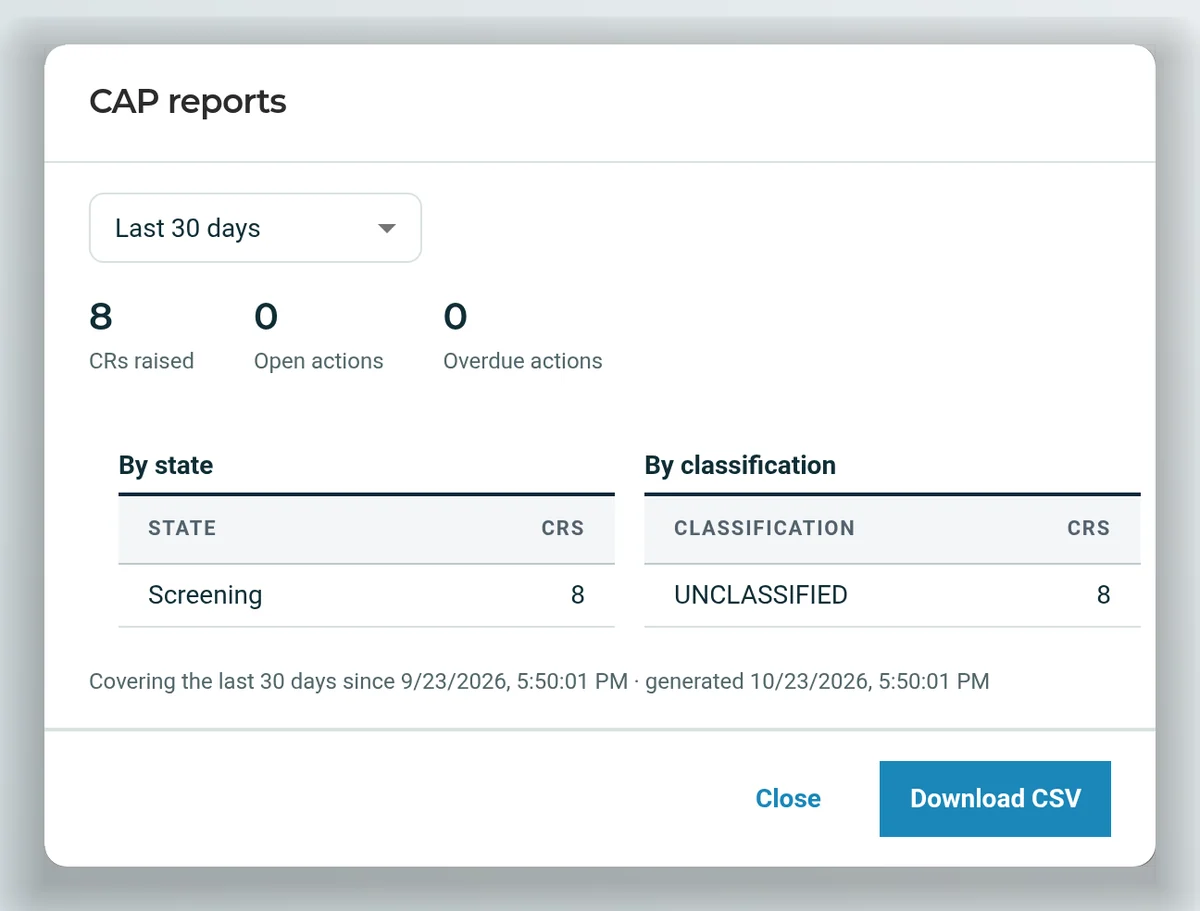
- CAP reports by state and classification, with open and overdue actions and CSV export.
Raise a report from a conversation. Screen one from any system.
AtomAssist can write a condition report for you on your plant's form, with the same quality checks as the intake page. It saves a draft to your Draft Box and doesn't submit it: you review and submit. Your other systems call screening through the REST API.
Draft_Condition_ReportExample conversation with synthetic details. The assistant drafts; a person reviews and submits, and screening starts only then.
# Screen one report with your plant's template
curl -X POST -H "X-API-KEY: $NUCLEARN_API_KEY" \
  -H "content-type: application/json" \
  -d @condition-report.json \
  "https://nuclearn.your-site.example/api/products/\
cap-screening-automation/automate?record_uid=$CR\
&automation_config_template_id=$TEMPLATE&automate=false"

# automate=false returns the suggested values to test with;
# automate=true records the screening for the template.
# Condition reports raised in the last 30 days, as CSV
curl -H "X-API-KEY: $NUCLEARN_API_KEY" \
  "https://nuclearn.your-site.example/api/products/\
cap-ai/condition-reports/reports/export?days=30"

# Also under /condition-reports: records, transitions,
# actions, comments, attachments, snapshots and the feed.
Access uses a Nuclearn platform API key, so the platform's sign-in, roles and licence apply.
Your form, your workflow, your trends
Trend coding and trending
Trend codes assigned at screening feed CAP AI's trending analysis: performance objectives and criteria over time, year-over-year heatmaps and pivots by any field, with a drill-down to the reports behind each count. Export to CSV or JSON, or pull the results into Power BI.
Automation KPIs
How many reports moved on and how many went to a person, how screening compares with your screeners' own decisions, and the manual sample, field by field and over time.
Your plant's form and criteria
Administrators set the fields a report carries and what a good description is graded against. The assistant is given exactly those fields, so the form stays yours.
Who may move a report
Each workflow step names who may take it. Left empty, it needs the record's own screening authority.
Action due dates
Default days for an action to close, set by classification.
Versioned definitions
Saved workflow definitions are kept, so an earlier one can be put back in force.
Promote when ready
Test a screening configuration, promote it to production and archive the old one, without a software release. Export and import configurations between environments.
Your platform's people and roles
Sign-in goes through the Nuclearn platform, so the same accounts and SSO apply, and platform roles and dataset permissions decide who can raise, screen, configure and read reports.
Your reports stay in your Nuclearn deployment.
Condition reports, procedures and screening results live in your plant's datasets on the Nuclearn platform, and access goes through the platform's sign-in and roles.
At your site or hosted
CAP AI runs on the Nuclearn platform, on your own servers or in a deployment Nuclearn hosts for you.
Built for air-gapped sites
Outbound web access is an administrator setting, left off at air-gapped sites, and CAP AI's features are switched on in the deployment itself.
Nuclearn platform sign-in
Single sign-on through your identity provider, or the platform's own accounts. CAP AI keeps no separate user store.
Screening authority
Only people your plant gives screening authority can record or change a screening decision or move a report on.
Keyed access for systems
Your CAP system and in-house tools call screening and the record API with a Nuclearn platform API key.
A certified company
Nuclearn is ISO/IEC 27001:2022 certified. CAP AI, the Smart CR workspace and procedure-grounded screening are each switched on per deployment.
Start with screening, or bring the whole report in.
Each part is switched on per deployment, so you can begin where your screeners feel it most.
CAP AI screening
Reads new reports from the CAP system you have, screens them with your template and writes the results back. Trend coding, the trending dashboard and KPIs come with it.
Procedure-grounded screening
Screening that cites your procedures, approved conventions and similar past reports, checks its quotes, and escalates when the sources disagree.
Smart CR workspace
Plain-language intake, similar reports as you write, a record with its actions and history, and a feed of what you follow.
AtomAssist
Draft a condition report from a conversation, saved to your Draft Box for you to check and submit.
What it is not
CAP AI doesn't own your plant's corrective action decisions, and it isn't your QA program. It suggests, explains and keeps the record; your screeners and your program decide.
Questions plants ask first
Do we have to replace our CAP system?
No. CAP AI screening works alongside the system you have: it reads new reports, screens them and writes the results back, and your other systems can call it through the REST API. The Smart CR workspace adds intake and a condition report record in Nuclearn if you want them; we'll talk through how that fits with what you run today.
Who makes the screening decision?
Your plant does. Under Appendix B to 10 CFR Part 50, corrective action is the licensee's program,2 and CAP AI keeps its decisions with you. You set the confidence thresholds and the share of reports sampled for a person to check. Anything below threshold, sampled or escalated goes to a screener, only people with screening authority can record or change a decision, and the record shows who decided.
Will it use our own codes and procedures?
Yes. Screening uses your plant's fields and labels. With procedure-grounded screening it cites your procedure datasets, your approved screening conventions and similar past reports. Past reports are context, not evidence on their own, and the report being screened is left out of its own precedents.
What does Smart CR count as a good report?
Whatever your plant says. Administrators set the form's fields and the criteria a description is graded against; the default is when, while, who, what and the consequence. The grade shows beside the form as someone writes, along with what's still to confirm before submitting.
What about cause evaluations, closure and effectiveness reviews?
Actions on a record already carry apparent cause, extent of condition and cause codes. The review, closure and effectiveness-review steps of the lifecycle are coming next, configured for your plant the same way as the rest.
Where does it run, and who can sign in?
On the Nuclearn platform, at your site or hosted by Nuclearn, including at air-gapped sites. People sign in through the platform, with single sign-on if you use it; systems use a platform API key. CAP AI, the Smart CR workspace and procedure-grounded screening are each switched on per deployment.
See a report written and screened.
We'll show a condition report written in plain words and checked as it's typed, screened with its reasons and sources, and followed through its record and trends, then answer your IT team's questions about deployment and sign-in.
- A live walkthrough on synthetic condition reports
- Your questions on deployment, sign-in and data
- Where CAP AI would give your screeners the most time back
Nuclearn CAP AI is backed by Nuclearn, whose products serve over 70 facilities in North America and the U.K.
Book a demo
Tell us a little about your site and we'll set up a time.
Thanks, we've got it.
We'll be in touch to set up a time. If it's urgent, email contact@nuclearn.ai.
Prefer email? contact@nuclearn.ai